Daily Notes
Daily Notes is a vibe coded VS Code extension for people who think and write inside their editor. It gives you a structured space for daily notes and task tracking, without pulling you into a separate app.
Inspired by todo.txt and NotePlan, Daily Notes keeps things plain-text, portable, and fast.
How It Works
Each day gets its own markdown file, named yyyy-mm-dd.md (e.g. 2024-11-01.md). You write notes, tasks, and thoughts in plain markdown. The extension takes care of the structure: surfacing today's note, rolling unfinished tasks forward, and aggregating everything across your notes so nothing gets lost.
No proprietary format. No lock-in. Just files.
Features
Daily Notes Panel
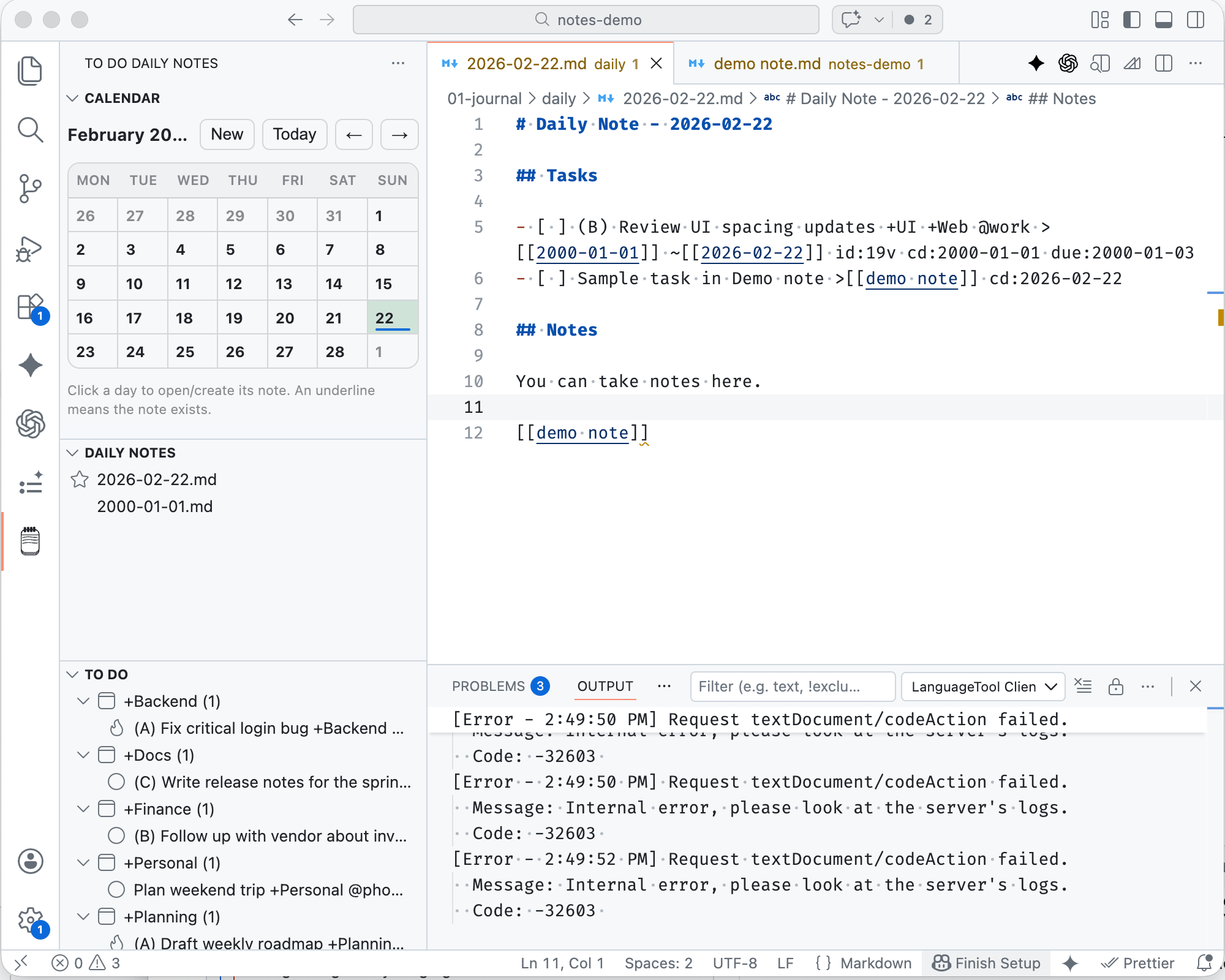
A sidebar panel lists all your daily notes, sorted newest-first. Today's note is marked with a star so it's always easy to find. Click any entry to open it immediately.
Calendar View
A calendar panel shows the current month. Dates that have notes are underlined. Click any date to open that day's note — or create it if it doesn't exist yet. Navigate between months or jump back to today with a single click.
Task Rollover
When you open today's note for the first time, any uncompleted tasks from your most recent previous note are automatically carried forward. You never have to copy tasks manually between days.
Task Aggregation
A dedicated panel collects all uncompleted tasks across every daily note and groups them by project. If a task belongs to +MyProject, it shows up under that project heading. Click any task to jump directly to the note it lives in.
Priority Sorting
Tasks are sorted by priority level — (A) through (Z) — following the todo.txt convention. High-priority work rises to the top automatically.
Generate todo.md
Export a snapshot of all your open tasks into a todo.md file, grouped by project. Useful for weekly reviews, sharing with teammates, or just getting a bird's eye view.
Autosave
An optional autosave feature saves your note every 10 seconds while you're working. It pauses during active typing so it doesn't interrupt your flow.
Task Syntax
Daily Notes uses todo.txt conventions for tasks, inside standard markdown checkboxes:
- [ ] (A) Write release notes +DailyNotes @writing id:n5f cd:2026-02-22
- [ ] (B) Fix calendar scroll bug +DailyNotes id:111 cd:2026-02-22 due:2024-11-05
- [x] Review PR +Work @github id:hqo cd:2026-02-22 dd:2024-11-01
| Token | Meaning |
|---|---|
| (A)–(Z) | Priority |
| +ProjectName | Project tag |
| @context | Context tag |
| due:yyyy-mm-dd | Due date |
| cd:yyyy-mm-dd | Creation date (auto-managed) |
| id: | Task ID (auto-managed) |
| dd:yyyy-mm-dd | Done date (added on completion) |
The extension automatically manages id: and cd: tokens when you save. When you check a task as done, dd: is added with today's date.
Inspired By
todo.txt — The original plain-text task format by Gina Trapani. Human-readable, tool-agnostic, and timeless. Daily Notes adopts its priority, project, and context syntax so your tasks stay portable.
NotePlan — A calendar-linked markdown notes app that made daily notes a first-class concept. The idea of navigating notes through a calendar and rolling tasks forward comes directly from NotePlan's workflow.
Requirements
- Visual Studio Code v1.95.0 or later
- A folder of daily note files (the extension will help you get started)